Frequently asked questions
Table of contents
Accessing the Zurich Access Portal
How do I find out more about Multi-Factor Authentication for the Zurich Access Portal?
You can find out more here:
Having trouble signing in to the Zurich Access Portal?
Download our troubleshooting guide for help and support.
How do I register to use the Zurich Access Portal?
Go to www.zurich.co.uk/corporate-risk/zurich-access-portal which gives you full details of the portal and how to register. All you need is your firm’s FCA registration number and your work email address.
Do I need an agency number?
Yes, if you are the first person from your firm to register and you don’t have a relationship with us already, you’ll need to apply for an agency number.
Do I have to sign a new Terms of Business Agreement for the portal?
Yes, if you are the first person from your firm to register and don’t have a relationship with us, you will need to complete a new Terms of Business Agreement. This will delay the completion of your registration.
I have registered but can’t download a quote or view existing policies.
If you’re the first person from your firm to register, we’ll need to run a few checks. These usually take up to 5 working days. Once they’re done, we’ll let you know if you’re all set or if we need anything else from you.
If your firm is already registered, your firm’s portal administrator will need to complete your registration. They’ll link you to the right agency code(s) and set up your access and sharing permissions.
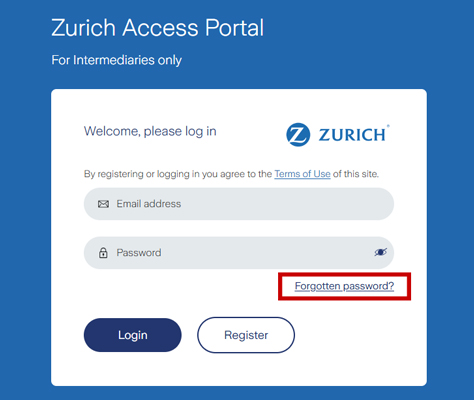
What if I forget my password?
Click on the forgotten password link on the login screen and enter your email address you registered with. You will then receive an email with instructions to reset your password.
What should I do if I have issues signing in?
If you keep seeing ‘invalid email address or password’ and you’re sure your details are correct, your account might be locked because of too many failed attempts.
If that’s the case, email us at zapsupport@uk.zurich.com. We’ll unlock your account so you can reset your password.
Quoting
Hints and tips
Before starting, there are some essential pieces of information that you’ll need:
- The customer’s Companies House reference number
- Membership data, formatted in our standard template
- Membership eligibility
There is some other important information that would be useful to have handy. Not having if won’t stop you obtaining a quote, but the information will be needed if you want to apply for cover. Any new information may affect the terms we offer, and in some cases may mean we need to withdraw the quote.
- If the scheme has had more than 2 claims in the last 5 years you won’t be able to obtain a quote through the portal. Instead email your quote specification and membership data to zcrquotes@uk.zurich.com who will assess your request, and it if prepared to, will send you a manual quote. Please note that the normal SLA for a manual quote is 10-working days
- Details of any long-term absentees
- Previous medical underwriting decisions, noting previous decision letters will be required within 30 days of the policy starting if you apply for cover
What type of clients can I quote for?
If the customer (principal employer) and any participating employers are UK registered limited company with a Companies House registration number, you can obtain a quote.
You cannot quote if the customer is a limited liability partnership (LLP) or a branch of an overseas company.
The policy is already insured with Zurich; can I get a quote?
No, the policy must be new to Zurich.
However, we can help. If you already have a Zurich policy, we’ll look at converting it so it can be managed in the portal when the rate guarantee end date arrives.
The customer details are wrong
There are sometimes short delays with details from Companies House being updated in our systems. Don’t worry provided you have used the correct Companies House reference number; you can use the edit function to change the customer’s name or registered address.
The customer isn’t showing
There may be occasions where a recently registered company hasn’t been updated in our systems. You won’t be able to obtain a quote through the portal. However, if the quote is a scheme with 10 or more lives simply send the quote specification and quote data to zcrquotes@uk.zurich.com. We’ll review and see if we can provide you with an offline quote
What occupations are allowed in the portal?
Most. However, if the following duties/occupations are included within the membership you will need to email zcrquotes@uk.zurich.com to request a quote outside of the portal:
- Travel for work to destinations against Foreign, Commonwealth and Development Office advice
- Work offshore
- Nuclear power generation or services that support this industry
- Manufacture, process, or storage of explosives
- Manufacture of hazardous chemicals and/or toxic substances
- Underground mining, surface mining, quarrying or dam construction
- Military personnel or armed security personnel
- Police officers, fire fighters, coast guards or prison guards
- Pilots (fixed or rotary wing)
- Professional sportspersons
- Medical doctors, registered nurses, paramedics, or ambulance personnel
- Barristers
- Non-executive directors can’t be included in Group Income Protection or Group Critical Illness quotes
What size policies can I get a quote for?
You can quote for policies with 3 or more employees.
What is the maximum number of previous claims allowed?
Two claims within the last 5 years.
What are the absentee requirements?
If you are preparing a Group Life quote, you will be asked to supply details of any long-term absentees to get or apply for a quote. These will be referred to a scheme underwriter to review who will let you know how to proceed.
Is there a limit on the number of categories?
A maximum of 4 categories can be created for Registered, Registered Group Life Master Trust, Group Income Protection, and Group Critical Illness quotes.
Excepted and Excepted Group Life Trust Solution policies limited to one category in view of HMRC rules.
Can I get a quote with a mixture of registered and excepted benefits?
No. If you need a quote that includes multiple trusts, please send your request to zcrquotes@uk.zurich.com.
What methods of payment are available in the portal?
Premiums can be paid monthly by Direct Debit and annually by Direct Debit or Direct Credit. The same rates will apply regardless of the premium frequency or method.
Is there a minimum premium?
Yes, the minimum annual premium is £450.
Can I get a flex quote in the portal?
No. If you need a quote for a scheme that includes flexible benefits including Spouse Partner Life Assurance (SPLA) please send your request to zcrquotes@uk.zurich.com.
What Group Income Protection benefits do you offer in the portal?
- Basic benefit from 40% to 80% of salary with any offset up to £10,000
- 8,13, 26, 41 & 52-week deferred periods
- Escalation rates of 0%, 2.5%, 3% & 5% with Retail Price Index (RPI) options
- Benefit payment terms to terminating age and 2, 3, 4 & 5-year limited payment options
- A lump sum (capital option) for quotes with a limited payment option
What Group Life benefits do you offer in the portal?
- Lump sum benefit of 0.5 to 15 times policy salary
- Fixed benefits up to £1,000,000
Can redundancy cover be included for Group Life schemes?
Yes, you can request up to 24 months redundancy cover. For request to include up to 12 months redundancy cover, there will be no change to the rate(s).
Can I get a Group Critical Illness quote via the Zurich Access Portal?
Yes, you can.
Can I get a quote where the scheme is closed to new employees?
Group Life Insurance and Group Income Protection quotes must have at least one category for new members to join.
Group Critical Illness quotes cannot have any closed categories.
What eligibility definitions are available?
Seven default eligibility definitions are available:
- All permanent employees which include fixed term contractors (FTCs)
- All pensionable employees
- All directors and managers
- All directors
- All managers
- All other employees not included in any other category
- All salaried partners
- Other - Free format. These will be checked when you apply for cover
- Always use clearly defined definitions rather than general descriptions. For example including a job grade is better than terms like senior, which can have multiple definitions
- Never include a person’s name
Can I include a service requirement to the eligibility?
Yes, there are four default options available: none, 3, 6 or 12 months, or a free format option to set another service requirements.
What definitions of salary are available?
Four default salary definitions are available and a free format option:
- Basic annual salary or wages, before any salary sacrifice
- Basic annual salary or wages, after any salary sacrifice
- Basic annual salary or wages only, plus the annual average of any other earnings from the employer over the preceding 3 years (or since joining that employer if this was within the preceding 3 years)
- P60 earnings in previous tax year or annualised averaged earnings for members who joined within the same tax year
- Other - Free format. These will be checked when you apply for cover
What terminating ages can be covered?
Group Life Insurance quotes: You can select from 60 to 75, including State Pension age.
Group Income Protection quotes: You can select from 60 to 70, including dynamic State Pension age and State Pension age.
Can I quote if the scheme has medically loaded members?
Group Life Insurance quotes: All extra mortality/morbidity (EM) loadings can be included but will be referred to a scheme underwriter if greater than 250EM.
If a member of a scheme has a per mille loading, and the scheme includes 10 or more members, send your quote specification and data to zcrquotes@uk.zurich.com. We may be able to provide you with an offline quote.
Group Income Protection quotes: All EM loadings can be included but will be referred to a scheme underwriter if greater than 100EM. You cannot include a per mille loading.
If a member of a scheme has a per mille loading, and the scheme includes 10 or more members, send your quote specification and data to zcrquotes@uk.zurich.com. We may be able to provide you with an offline quote.
Can I quote if the scheme includes members with a decline or postpone decision, had an exclusion applied or have been restricted due incomplete medical underwriting?
Where a member has been underwritten and has either been restricted, declined, postponed, or had an exclusion applied you will be able to request a quote through the Zurich Access Portal.
Any quotes requested with one of these decisions will need to be assessed by a scheme underwriter before the quote can be downloaded.
Do I need to use a data template?
Yes, you will need to use the data template which you can download on the quote journey.
Can I carry out requotes?
Yes, you can carry out requotes by selecting the requote option from the “What do you want to do?” drop down list.
How long is the quote guaranteed for?
Quotes are guaranteed for 90 days. However, you can refresh the quote and get a new variation if you need to discuss further with your client.
Can you provide a quote where there are zero-hour contractors or TUPE members?
TUPE members can be included where the membership is open to new members joining.
Zero-hour contractors can be included in a Group Life Insurance quote subject to scheme underwriting agreement.
What are the rules about overseas travel on a portal case?
Travel is allowed but not for those who are travelling for work to destinations against Foreign, Commonwealth and Development Office advice (advise against all travel & advise against all but essential travel), or in breach of UK, EU, or US sanctions).
Does the portal cover employees who are resident or seconded overseas?
No, the portal doesn’t cover overseas members for new business cases.
What is the minimum automatic acceptance limit on the portal for type of product?
- Group Life is £650,000
- Group Income Protection is £80,000
- Group Critical Illness is £500,000
Applying
Can we apply for cover online?
Yes, you can apply online for a portal quote.
Important: check all the details are correct as you go through each screen when applying. Don’t forget to include all participating employers and make sure the proposed start date and yearly revision dates are correct.
If you are asking us to transfer decisions from a previous provider, you can upload these when first applying. However, you must supply copies of the decision letters within 30 days of cover starting; otherwise, benefits will be restricted to the Automatic Acceptance Limited. This may also delay to the availability of the inception Statement of Account.
Any wrong details will mean the policy is set up incorrectly and may mean it has to be cancelled.
Once you have completed the final step of the apply process, and we’ve done our usual business checks, we’ll send the proposal forms and where applicable a direct debit mandate to your nominated signatories to add their eSignature.
These must be completed and sent back with 30 days.
Why have I received a DocuSign request after my client has signed the forms?
Although you will be able to download a copy of the complete form from the portal, we know you may not visit it every day, therefore DocuSign sends you a copy of the completed form.
What happens if the DocuSign forms are not completed within the 30 days?
After receiving our reminders, if any forms are not returned with 30 days, the policy will be cancelled from commencement. If the policy is still needed, you will have to obtain a new quote and reapply.
Where will I be able to access the policy documents?
These will be available to download in the existing policies area on the portal once the policy is in force.
When will documents be available to view and download?
- The statement of account will normally be available shortly after you have received the on-risk email
- Invoices will normally be available shortly after you have received the on-risk email
- Policy schedules and proposal forms will be available shortly after you have received the completed proposal form from Docusign
- Direct Debit notification letters are normally available to view within 5 working days of the mandate being received
Annual Revision
Can I complete a revision on the portal?
Yes, this is an important function of the portal.
Hints and tips
Poor data quality causes most issues. To help avoid them:
- Users must use the data template we send to you or that you can download from the portal
- Remove any formula in the original data source before updating the data template
- Remove any claimants before uploading the data
When is the annual revision invitation issued?
You will receive a series of reminders from us ahead of the Yearly Revision Date, the first will be sent 90 days in advance. These will let you know what our requirements are to complete the annual revision and will provide you with a link to the data template you need to complete.
You can submit revisions as early as 21 days before the yearly revision date.
We’ll continue to send reminders for any outstanding revisions. If they are not completed within 60 days of the yearly revision date, we’ll contact the policyholder directly.
If they’re still not done 90 days after the yearly revision date, we may have to cancel the policy.
What is the earliest date I can fully complete the revision/rate review?
If you are having difficulty obtaining the annual membership, please contact zapsupport@uk.zurich.com at the earliest opportunity. We may be able to agree an extension. If we do you won’t be able to complete the annual revision in the portal, instead we’ll need to complete this for you offline.
The portal is asking me to confirm details for a member who left in the past
When faced with this situation simply add a leave date for the start of the adjustment policy period. For example, if you are adding data for the policy starting 1st June 2026, add a leave date 1st June 2025. This will allow you to proceed and the leaver won’t be included in the revision statement of account.
I’ve used the wrong data; how do I correct this?
If you have completed each step of the revision process, and received confirmation the revision has been completed, we will need to rework the revision account for you. Please send a copy of the correct data to zcrservicing@uk.zurich.com and explain what has happened.
If you haven’t completed the revision process, click through to the final declaration page where you are asked to confirm the details are correct. Select ‘No’ and you’ll be presented with an option to upload member data. Select this, upload the correct data and restart the process.
What is the tolerance on the portal at revision stage?
For a unit rate policy, unless stated otherwise in your policy schedule, there’s a 25% tolerance until the rate guarantee end date.
For an individual costing policy, there’s no limit on tolerance until the rate guarantee end date.
For full details, check section 8.5 "Will premiums change at any other time?" in the terms and conditions.
When will documents be available to view and download?
The statement of account, invoices for balance premiums and new Direct Debit notification letters will normally be available shortly after you receive the email confirming the revision has been successful.
Rate review
Can I complete a rate review on the portal?
Yes, this is an important function of the portal.
Hints and tips
The most common issues are caused due to bad data. Here are some simple things you can do to avoid them:
- Users must use the data template we send to you or that you can download from the portal
- Remove any formula in the original data source before updating the data template
- Ensure that any claimants are removed before attempting to upload the data
When is the annual revision/rate review invitation issued?
You will receive a series of reminders from us ahead of the Rate Guarantee End Date, the first will be sent 90 days in advance. These will let you know what our requirements are to complete the annual revision and will provide you with a link to the data template you need to complete.
You can accept a rate review quote as early as 21 days before the Rate Guarantee End Date. If you need a rate review quote earlier, you can get one through the portal.
We’ll keep reminding you about any revisions or rate reviews that are still outstanding. If they’re not completed within 60 days of the Rate Guarantee End Date, we’ll start contacting the policyholder directly.
If they’re still not done 90 days after the yearly revision date, we may have to cancel the policy.
What is the earliest date I can fully complete the rate review?
The window to accept a rate review quote opens 21 days before the policy’s Rate Guarantee End Date. We’ll send an email letting you know when the window opens.
I’m having difficulty obtaining the annual data, what do I do?
If you are having difficulty obtaining the annual membership, please contact zapsupport@uk.zurich.com at the earliest opportunity. We may be able to agree an extension. If we do you won’t be able to complete the annual revision in the portal, instead we’ll need to complete this for you offline.
Can I get an indicative rate review quote?
Yes, you will be given clear instructions of how to get the indicative quote 90 days in advance of the Rate Guarantee End Date.
Can I change the commission on a rate review quote?
Yes, you can change the commission on the quote.
Can I change the payment frequency on a rate review quote?
Yes, you can change this on the quote.
The portal is asking me to confirm details for a member who left in the past.
When faced with this situation simply add a leave date for the start of the adjustment policy period. For example, if you are adding data for the policy starting 1st June 2026, add a leave date 1st June 2025. This will allow you to proceed and the leaver won’t be included in the rate review statement of account.
When will documents be available to view and download?
- The statement of account, invoices for balance premiums and new Direct Debit notification letters will normally be available shortly after you receive the email confirming the rate review has been successful
- Updated policy schedules will normally be available shortly after you receive the email confirming the rate review has been successful
General servicing
Do I need to send updated data in throughout the year?
You only need to give us information once a year. We’ll email you closer to the time to let you know what we need.
For full details, check section 9: "Information we need at the yearly revision date" in the terms and conditions.
If a member joins the scheme or their benefit goes over the Automatic Acceptance Limit, please let us know as soon as possible with their full details, including an email address. This will allow us to start our underwriting process and temporary cover at the right time.
For more details, see sections 2.6 "Underwriting" and 2.7 "Temporary cover" in the terms and conditions.
Can I request scheme history?
Yes, you can request this through the "Existing policies" area on the portal. When you find the policy, you are looking for, select “Request scheme history” from the drop-down option.
You can also request a scheme history for a non-portal policy through the portal.
Can I request a policy termination?
Yes, you can request this through the "Existing policies" area on the portal. When you find the policy, you are looking for, select “Initiate policy termination” from the drop-down option.
You can also request a termination for a non-portal policy through the portal.
Can I update the regular customer contact?
Yes, you can do this during the revision or rate review process. Outside of this, send your request to zcrservicing@uk.zurich.com.
I want to change who in my firm is the administration contact, what do I do?
You can do this within the "Existing policies" area on the portal. When you find the policy, you are looking for, select “Update policy admin contact” from the drop-down option.
Who do I contact if I have a query or need help?
- Questions about portal registration email zapsupport@uk.zurich.com
- Quote/apply email zcrquotes@uk.zurich.com
- Having problems with the portal zapsupport@uk.zurich.com
- For changes to the benefit design please email zcrquotes@uk.zurich.com
- Medical underwriting email medical.underwriting@uk.zurich.com
- Group Life claims email zcr.life.claims@uk.zurich.com
- Group Income Protection claims email zcr_claims@uk.zurich.com
- For general servicing changes please email zcrservicing@uk.zurich.com
- Or you can speak to your usual Zurich contact.
Why can’t I see my scheme in the portal?
It maybe because the scheme isn’t in force yet, the scheme has been cancelled, or your registration hasn’t been linked to the correct agency code. For retention records please refer to our privacy policy.
You also won’t be able to view flex or voluntary schemes in the Zurich Access Portal.
Claims
Is it possible to submit a claim for my customer in the portal?
Yes, you can do this in the "Existing policies" area on the portal. When you find the policy, you are looking for, select “Submit a claim” from the drop-down option.
You can also notify us of a claim for a non-portal policy through the portal.